Medical Guardian System Review
We compared Medical Guardian to other industry leaders. It excels at customization.





Medical Guardian occupies a good middle ground with price, features, and customer service, making it among the best medical alert systems in our book.
Medical Guardian’s wide selection of equipment offers long-range devices, waterproof options, and solutions for both more and less active older adults.
And best of all: this medical alert company's monthly prices all land under $45 per month.
Medical Guardian pros and cons
 Landline- and cellular-based home systems Discounts and extras available for annual payments 32+ hour backup battery Multiple options for active seniors
 No trial period Add-ons necessary for larger homes
Medical Guardian cost
Medical Guardian’s monthly prices range from around $30 to $45 per month depending on which medical alert device you choose. This lands Medical Guardian in the middle of the pack for the most affordable medical alert systems.
Most packages come with a wearable alert button and a base station or GPS unit. You can keep each of the wearables (a wristband or pendant) on 24/7, whether you're in the shower, running errands, or relaxing at home.
|
Best for
|
Equipment
|
Per month
|
Equipment fee
|
Equipment
|
Range from base
|
Backup battery
|
View plan
|
|---|---|---|---|---|---|---|---|
|
Homes with landlines |
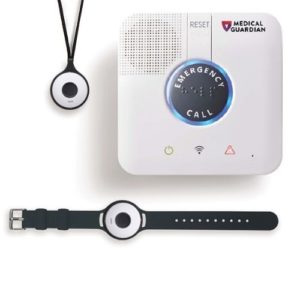 Classic Guardian |
$29.95 | Free lease |
Base unit, wearable alert button |
1,400 ft. |
32 hr. |
View Packages |
|
Homes without landlines |
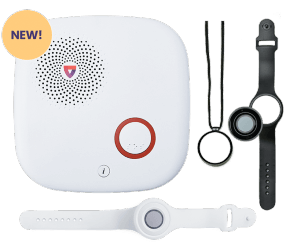 Home 2.0 |
$34.95 | $124.95 |
Base unit, wearable alert button |
1,400 ft. |
32 hr. |
View Packages |
|
Errand runners |
 Mobile 2.0 |
$39.95 | $124.95 |
GPS unit, charging cradle, wearable alert button, belt clip |
500 ft. |
72+ hr. |
View Packages |
| Low profile assistance |
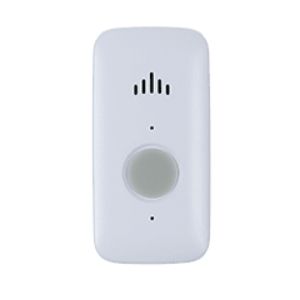 |
$39.95 | $124.95 | Mini Guardian, charging cradle, lanyard, belt clip | Unlimited | 120 hr | View Packages |
|
Frequent travelers |
 Active Guardian |
$44.95 | Free lease |
Charger, wearable GPS unit |
Unlimited |
72 hr. |
View Packages |
Info current as of post date. Offers and availability may vary by location and are subject to change.
You can get discounts by changing your payment schedule. Medical Guardian allows you to pay monthly, quarterly, semi-annually, or annually for all your systems. The lump sum is larger for yearly payments, but the systems are cheaper overall this way.
Medical Guardian equipment
But don't be turned off by a heavy lump sum. Medical Guardian has some impressive equipment for active older adults and those who prefer to stay home.
If you or your loved one have mobility issues, look into the Classic Guardian or Home 2.0. These systems come with a base station and a wearable button that allow you to move freely around your house. You can call for help with the lanyard or wrist button or use the base station.
GPS medical alerts are better for busy, more mobile users. Like their home-based counterparts, the Mini Guardian, Active Guardian, and Mobile 2.0 are equipped with a simple help button, two-way talk, and GPS tracking for emergency responders to find you quickly whether you're at home or not.
The Mobile 2.0 system comes with a wearable alert button and a separate GPS unit you’ll need to take with you at all times. The Active Guardian, on the other hand, rolls all of it into one wearable device.
1. Classic Guardian: Best for homes with a landline
Starting at $29.95 per month with no up-front equipment fees, the Classic Guardian is Medical Guardian’s most affordable option. The price is tempting, but the package requires a landline to function and the equipment is basic.
The Classic Guardian kit comes with a base unit and your choice of a lanyard or wristband help button. The base station has a giant emergency call button and a clear two-way talk system with a powerful speaker so you can call for help on the other side.
The wearable alert button has an impressive range of 1,400 feet, so you can move about your house away from the base station. You can move throughout your garden, go upstairs, or even visit the neighbors as long as it's within range of the base station.
2. Home 2.0: Best for homes without a landline
The Home 2.0 is a cellular version of the Classic Guardian, so you won’t need a landline to install it. The new 2.0 version of the Home Guardian features an improved backup battery and system range, bringing it up to par with its landline-based cousin.
You can check system status on this Medical Guardian alert system. Instead of conveying information through colored lights like the Classic Guardian, the Home 2.0 talks to you. It's also easy to self-test the system to make sure it's working correctly.
The Home 2.0 also differs from the Classic Guardian in its payment structure. You purchase the Home 2.0 equipment outright for $124.95, whereas the Classic Guardian equipment is leased from Medical Guardian for free. It also costs a little more per month (about $5 extra) to monitor the Home 2.0 vs. the Classic Guardian.

Medical Guardian no longer carries Family Guardian. This unique medical alert system was designed for caregivers who lived in a different home than their loved ones and doubled as a security system.
3. Mobile 2.0: Best for running errands
The Mobile 2.0 is a two-piece system that you can take with you anywhere. It consists of a GPS module and an optional wearable button, all of which costs $124.95 and is yours to keep.
Of the GPS units we’ve seen from other medical alert systems, the Mobile Guardian is the only one we’ve seen with two buttons. You can use the GPS module by itself or wear the smaller button on a lanyard or wristband. If you choose to wear the smaller buttons, you'll need to stay within 500 feet of the GPS module so that you can use its speaker and location tracking technology.
Both devices are waterproof too, so you can get help in the shower, when you’re swimming, or if you get caught in the rain on the way home. The Mobile 2.0 is also compatible with the Icons Collection fashion pendants if you want to add a little safety to your style.
4. Mini Guardian: Best for discreet assistance
The Mini Guardian is the newest addition to the Medical Guardian family. It's sleek, it's effective, and it's discreet.
All this makes the Mini a great option for someone who wants a way to call for help quickly without using a heavy lanyard or wristwatch.
The Mini Guardian is about the size of a domino and has a battery that lasts up to five days. But location tracking is what it does best. With built-in GPS, Wi-Fi, and Triangulation signals, it makes it easier for help to find you from anywhere.
This Medical Guardian device costs $124.95 upfront. For an extra $10 per month, you can get a unit with automatic fall detection.
5. Active Guardian: Best for frequent travel
The Active Guardian is a wearable lanyard button with an unlimited call range. With the help of GPS and Wi-Fi location technology, you can get help from anywhere. This device is waterproof and has a battery life of five days so that it can go with you everywhere.
The unit itself is leased for free, but monitoring costs $44.95 per month.

The Freedom Guardian smartwatch is packed with features. Between its tracking, one-touch help button, and reminders, it's become one of Medical Guardian's most popular products. So popular that it's sold out!
But luckily the newest version is up for preorder now. Freedom 2.0 promises improved activity monitoring and reminders.
Learn about this and other smart medical alert watches.
Medical Guardian add-ons and upgrades
If you have a larger house or a loved one who also needs care, you might want to add more devices to your system. Medical Guardian charges only $2.99 per month to add an extra lanyard, wrist button, or wall-mounted button.
You can also get a voice-activated button for $5 per month extra or a fall detection pendant for an additional $10 per month. These devices aren’t standard in medical alert systems and can come in handy if you aren’t near the base station when you need help.
Each of the plans we looked into included a free lockbox for annual subscribers. This device makes it easier for first responders to get into your home to help you in an emergency.
|
Add-on
|
Price
|
Compatibility
|
Learn more
|
|---|---|---|---|
 |
$2.99/mo. | Classic Guardian, Home 2.0, Mobile 2.0 | View Packages |
 |
$2.99/mo. | Classic Guardian, Home 2.0, Mobile 2.0 | View Packages |
 |
$2.99/mo. | Classic Guardian, Home 2.0, Mobile 2.0 | View Packages |
 |
$2.99/mo. | Home 2.0, Mobile 2.0 | View Packages |
 |
$4.99/mo. | Home 2.0, Mobile 2.0 | View Packages |
 |
$10.00/mo. | Home 2.0, Mobile 2.0 | View Packages |
Info current as of post date. Offers and availability may vary by location and are subject to change.
MyGuardian app and online portal
Medical Guardian offers a caregiver portal called MyGuardian. Access is included with each equipment package. Caregivers can log on via the smartphone app or online portal to update their loved one's information, chat with other caregivers, organize tasks, view location history, pay Medical Guardian bills, and view system status.
Staying up-to-date on real-time emergency calls costs extra, though. The $2.99/mo "OnGuard Alerts" feature is available with any equipment package.
Medical Guardian customer service
The customer service options through Medical Guardian are pretty standard. Paying customers will get access to an online portal where they can view things like account details and payments. If you have a question, check the page’s FAQ section first. From here, you can find answers on anything from Medical Guardian’s Freedom Guardian watch to how to get fall alerts.
While researching Medical Guardian, we came across mixed customer reviews. Most reviews reported friendly representatives, reliable products, and even competitive price matching. But we also saw feedback from upset customers who claimed issues like deceptive pricing. The majority of customers seemed satisfied with the quality of Medical Guardian’s customer service and equipment.
How Medical Guardian stacks up
|
Brand
|
Best for
|
Lowest monthly price
|
In-home range
|
Backup battery
|
Landline option available
|
Multiple wearable options
|
Learn more
|
Read review
|
|---|---|---|---|---|---|---|---|---|
 |
Best overall | $21.95/mo. | 1000 ft. | 32 hours |
 Yes Yes |
Yes |
View Packages | Read review |
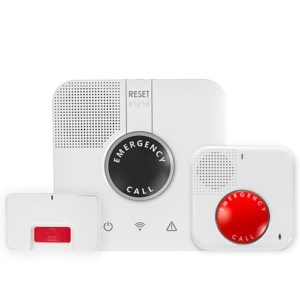 |
Best for budgets | $24.95/mo. | 1300 ft. | 32 hours |
 No No |
No |
View Packages | Read review |
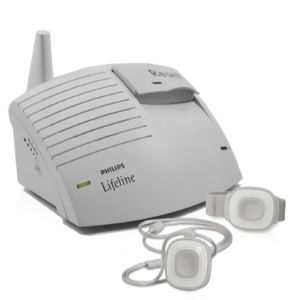 |
Best for fall detection | $29.95/mo. | 400 ft. | Not available |
Yes |
Yes |
View Packages | Read review |
|
|
Best for customization | $29.95/mo. | 1300 ft. | 32 hours |
Yes |
Yes |
View Packages | Read review |
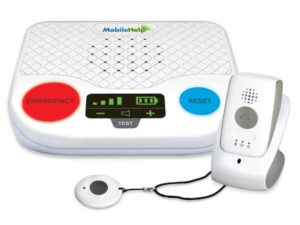 |
Best for active lifestyles | $19.95/mo. | 1400 ft. | 24 hours |
No |
Yes |
View Packages | Read review |
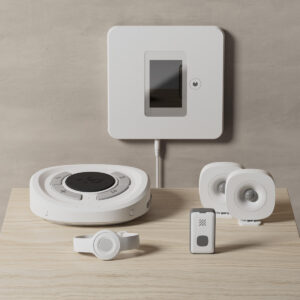 |
Best smart features | $24.99/mo. | 200 ft. | 6 hours |
No |
Yes |
View Packages | Read review |
Info current as of post date. Offers and availability may vary by location and are subject to change.
Final word on Medical Guardian
Medical Guardian isn’t cheap, but the equipment that comes with it makes it a great value. For example, you can call for help with the Classic Guardian 1,400 feet (or over 8 football fields) from the base station. Other packages, like the Active Guardian, use multiple forms of location technology to pinpoint where to send help.
If you’re set on Medical Guardian but still have money concerns, consider paying for your kit annually or semiannually for a discount. These plans throw in extra equipment and a modest price cut. While their price range doesn’t fit everyone’s needs, you get what you pay for with Medical Guardian.
Medical Guardian FAQs
Medical Guardian sells a pendant called "Fall Alert" with fall protection for $10 extra per month. These specialized pendants have sensors that measure impact and speed and are designed to send a signal to your base station if they hit the ground. While fall alerts aren't 100% foolproof, they're worth considering in a medical alert system.
From what we found, no. During our research, we compared Medical Guardian to other popular medical alert companies. The rep from Life Alert we spoke with quoted us double what Medical Guardian costs.
Unfortunately not. Some Medicare Advantage Plans might cover it or get you reimbursement for your costs, but standard Medicare does not. Medical Guardian has a series of helpful Medicare blogs that explain how a medical alert system fits into your insurance coverage.
A personal emergency response system (or, PERS) is just another word for a medical alert system.
These devices are small or wearable and connect to a monitoring center. From there, someone can connect you to the help you need in a scary situation like chest pains or a fal.
Ultimately, the right one for you depends on your lifestyle.
If you're mobile or leave the house often, a GPS device that isn't limited to a signal with the base unit may be best. You can take these on vacation, errands around town, or down the street.
On the other hand, if you prefer to stay home or are homebound, an at-home system is more affordable and offers similar features.
How we reviewed Medical Guardian
For our Medical Guardian review, we compared prices, policies, and equipment from seven popular services to see where Medical Guardian fell among them. We called sales reps and read customer reviews across the web to get the right answers.
Read our full methodology to learn more about how we rank this and other products we review on SafeWise.

Recent Articles




The post Medical Guardian System Review appeared first on SafeWise.
Article source here: Medical Guardian System Review
