Online Safety for Kids in 2022: Parenting Tips for Tech

Following the COVID-19 pandemic, 76% of parents said their child had to switch to remote learning.1 Now two-thirds of parents say their child uses the internet more than before.
To support parents with our Internet Safety Guide for Kids, we surveyed 1,000 parents about the challenges they experience. They gave us their thoughts on parenting, remote learning, and internet safety:
- 60% of parents said remote learning has made parenting more difficult.
- 65% are more concerned about their child's internet safety since they started remote-learning.
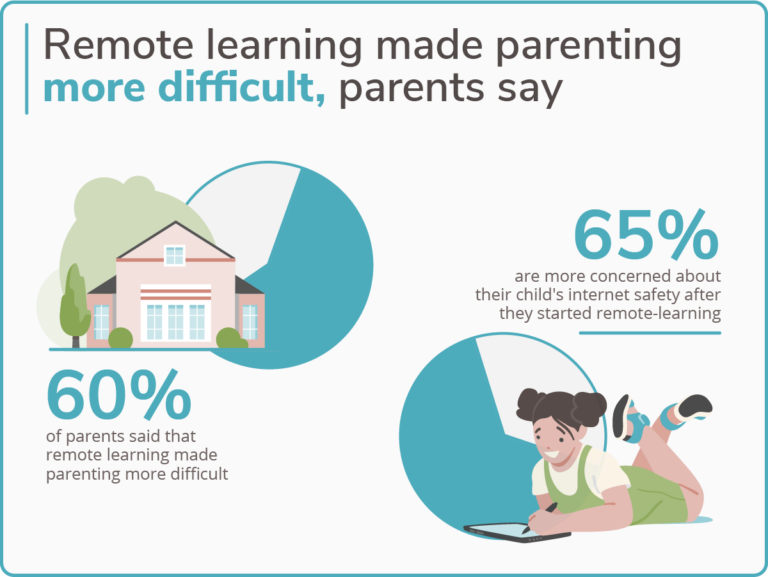
Image: SafeWise
Even with kids going back to school, many kids still spend extra time online. And it can be tough for parents to keep up with the ever-changing tech children use today.
We’ll go over parents’ main concerns for online children’s safety and provide resources, tools, and tips to help your child stay protected online.

Parents aren’t alone in taking steps to protect their children’s safety: 78% of parents told us they think their child’s school has taken appropriate steps to make remote learning safe for their child.
We recommend learning about your child’s school’s online policies and protections, as well as communicating any concerns with teachers and administration staff.
Over 58% of parents say their child’s internet habits concern them
Though schools can prevent some online material from reaching kids, most parents still worry about potential problems linked to more screen time.
Concerns vary by parents, but the most common concerns for children’s online safety were access to inappropriate material, too much screen time in general, or too much time spent on social media.
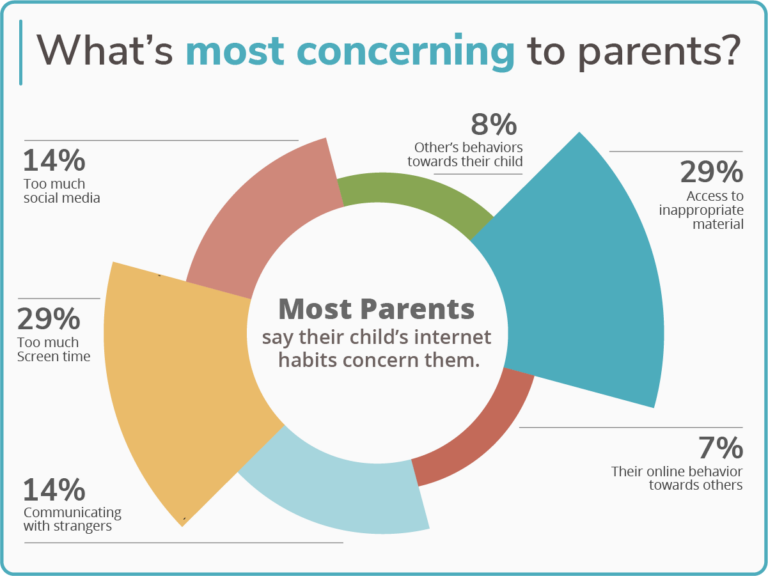
Image: SafeWise
To help your kids avoid issues with internet use, communicate what is acceptable, which apps or sites are off limits, and what to do if they run into anything strange.
The vast majority of parents have rules for online safety
Only 7% of parents told us they had no rules in their household for their child’s web usage.
For the 93% of parents who do have rules, here are the most common:
- Must report inappropriate content to an adult: 52.05%
- No chatting with strangers: 48.25%
- Share passwords with parents: 43.86%
- Limit time online: 43.06%
- No social media: 30.67%
- Only use the web with adult supervision: 34.17%
About half of parents have rules about reporting inappropriate content, chatting with strangers, sharing passwords, and time limits for web usage.
Nearly a third of parents don’t allow social media, and a little over a third of parents require adult supervision to use the internet. But keeping track of those things can get a little complicated with the addition of cell phones (and devices like tablets).

To help make rules clear, parents and kids can sign contracts for online family safety. Whether you use a template or create your own agreement, keeping the contract handy (or, better yet, visible) will help you and your kids remember the commitment.
Most kids have cell phones, but that decision is yours
These days, it’s more common for kids to have cell phones than not: only 16.58% of parents said their child does not have a cell phone—which means most kids have another individual portal for accessing the internet.
There’s a lot of discussion about the appropriate age to give kids a cell phone. We learned from our survey that most kids receive their first cell phones around ages 8–11. And less than 9% of kids receive cell phones after the age of 16.
Here are the most common ages for kids to get their first cell phone:
- Between 11 and 13: 23.78%
- Between 8 and 10: 23.68%
- Between 14 and 16: 13.89%
- Younger than 8 years old: 13.29%
- After 16 years old 8.79%
Cell phones can be a helpful tool for safety. For example, if a kid’s old enough to drive, a cell phone helps with road emergencies and provides another way for parents and kids to check in.
Still, it’s fair for parents to have concerns about cell phones.
Ultimately, it’s your responsibility as a parent to ensure your child is responsible enough to own and use one. (While you’re at it, it may be worth double-checking your own cell phone habits to make sure they’re not mimicking anything you wouldn’t want them to.)

If you’ve decided to get your kid their first cell phone, you’ll want to understand the differences between iOS and Android’s child-safety features.
Android allows for more third-party integrations than Apple. For example, with the Boomerang app, features like text message monitoring, geofencing, and uninstallation prevention don’t work when used on iOS.
However, Apple users have a lot of built-in safety features that you can turn on or off according to your family’s needs. And some systems like Family Time work well with iOS.
Regardless of which phone you pick, you can find ways to protect your child’s safety online.
How much is too much when it comes to screen time on cell phones?
Over half (55%) of parents told us their children are allowed to use their cell phones for over two hours a day. And 30% said their children are allowed four hours or more, or unlimited, screen time.
There is no clear standard for too much screen time for kids above 5, and remote school adds necessary online time.2 But having time limits and boundaries with content can help your child avoid potential issues associated with excessive screen time.
Social media concerns
For young minds, the world of social media can be a lot to take in. Kids may develop negative digital habits without proper discussions and boundaries.3 Most parents are concerned about Facebook, Snapchat, Instagram, Twitter, and TikTok.
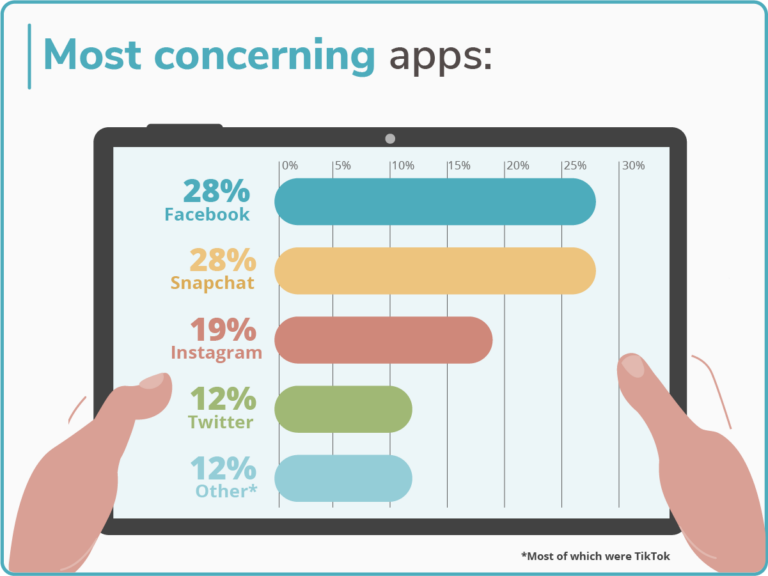
Image: SafeWise
Some apps are more dangerous than others, and they’re not all social media, so part of a parent’s duties is understanding what each app does. One parent said they worried their child spent too much time on Tinder, a dating app that requires users to be 18 years or older.
While you might be familiar with Facebook as a place for family and friends to connect, knowing that Snapchat allows for private temporary messages and stories may make you think twice about keeping it on your kid’s phone.
Popular video apps like YouTube feature kid-friendly versions, and often video apps will allow separate logins so you can set parental permissions for safe viewing.
55% of parents lean on parental control apps
It may sound wonderful to always be there when your kid needs you, or to stop something bad from happening, but it’s also an impossibility. Instead, you can use parental control apps to help limit what your kids can see. These apps can also monitor areas of their lives you may worry about.
We have a lineup of the best parental control apps. Here are a few things these apps can help you with:
- Social media and text monitoring
- Location tracking
- Content filtering
- Website blocking
- Screen-time management
Compare parental control app prices
|
Product
|
Annual price range
|
Free version available
|
Maximum number of devices
|
Trial period
|
Learn more
|
||
|---|---|---|---|---|---|---|---|
| Best overall |
 |
$49.00-99.00 |
 No No |
Unlimited | 7 days | View Packages | Read review |
| Best for younger kids |
 |
$15.99–$30.99 |
No |
10 | 14 days | View Packages | Read review |
| Best for budgets |
 |
$14.99 (intro. price) |
 Yes Yes |
500 | 30 days | View Packages | Read review |
| Best for iOS families |
 |
$27.00–$69.00 |
Yes |
5 | 3 days | View Packages | Read review |
| Best reporting dashboard |
 |
$54.95–$137.95 |
Yes |
15 | 3 days | View Packages | Read review |
Info current as of post date. Offers and availability may vary by location and are subject to change.
70% of parents have spoken to their child about cyberbullying
Online safety isn’t just about protecting kids from harmful material; kids need protection from other people. Most parents have spoken with their kids about cyberbullying, but there’s a lot to understand about the topic.
Unfortunately, 31.47% of parents reported that their child has been cyberbullied, but it’s a problem that parents can help their kids resolve.
We’ve spoken more in depth about how to stop cyberbullying before it starts, but here’s a quick summary:
- Know your child.
- Understand how social media and messaging apps work.
- Learn how cyberbullies work.
- Start an ongoing conversation with your child.
- Monitor your child’s accounts.
- Set limits.
- Watch for warning signs.
Here are a few tips on how to help if your kid gets cyberbullied:
- Stay calm and find out more.
- Document everything.
- Block the bully.
- Report cyberbullying to app administrators and school officials.
- Fight back with positivity.
Cyberbullying can’t always be avoided. But you can keep the conversation open to help your child understand how to protect themselves and others. By giving them skills to understand situations as they arise, you’ll support them beyond the limitations of technology.
Resources for working parents
Most parents have their own pandemic-related problems on top of their child’s remote learning, including staying on top of their working lives. The advancement and prevalence of technology has helped parents in some ways but makes their jobs tougher in other ways.
And, although most parents in our survey had another parent to help them out, nearly a quarter of the people we surveyed were single parents, making the blessings and burdens of child-rearing a solo effort.
Some parents give their children cell phones or wearable trackers to find them if they get lost or separated. It’s also a quick way to check in.
Whether you’re co-parenting or single, here are some extra tips for keeping your child safe online, even when you can’t be with them:
Methodology
Safewise conducted a proprietary survey of 1,000 randomly sampled American parents via Pollfish. The results were tallied on January 20, 2022.
Sources
- Safewise proprietary survey, conducted January 20, 2022. Accessed March 10, 2022.
- AACAP, “Screen Time and Children,” updated February 2020. Accessed March 10, 2022.
- Linda Charmaraman, Alicia Doyle Lynch, Amanda M. Richer, Jennifer M.Grossman, Wellesley Centers for Women, Lynch Research Associates, USA, “Associations of Early Social Media Initiation on Digital Behaviors and the Moderating Role of Limiting Use, October 2021. Accessed March 10, 2022.

Recent Articles




The post Online Safety for Kids in 2022: Parenting Tips for Tech appeared first on SafeWise.
Article source here: Online Safety for Kids in 2022: Parenting Tips for Tech

No comments:
Post a Comment